The Underwater Edit Clinic #9: When More Detail Makes Your Underwater Photo Look Worse
The Underwater Edit Clinic #9

You bring out more detail in the coral. Its edges look sharper, and the texture becomes easier to see. At first glance, the photograph seems better: the coral appears more defined, and the added detail draws your attention.
Then you step back and take in the whole image. The coral feels harsh, the water looks busier, and the sunlight has lost some of its gentle glow. The details may be clearer, but they now compete with the softer qualities that helped make the scene feel natural and balanced.
What happened? You made the detail more noticeable, but that did not necessarily make the photograph more effective. Stronger edges and more visible texture can add definition, yet they can also make an image feel less harmonious when they draw too much attention from the subject, water, or light.
Start with what the photograph needs

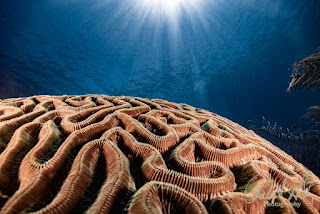
Start by looking closely at the photograph. The coral already has plenty of natural texture, so it may not need extra sharpening or detail enhancement. Soft rays of sunlight filter through the water, while the open blue space adds depth. Visible backscatter is present too, adding small distractions that compete with the main subject.
Each element calls for a different approach. You may need to reduce the backscatter, but the coral provides texture and a strong foreground that you should preserve. The sunlight helps establish the scene’s atmosphere, so any adjustments should retain its soft, natural quality.
Before reaching for a detail adjustment, ask:
What is actually keeping this photograph from working?
If backscatter causes the distraction, making the texture more pronounced won’t solve the problem. Backscatter comes from particles or debris in the water, so increasing texture may only emphasize the visual clutter without addressing its cause.
If the coral already has enough definition, adding more detail may add little and can change the scene's overall feel.
The first step in editing is to identify what's causing the distraction, then choose an adjustment that addresses that specific problem.
Compare the whole photograph

In the finished version on the left, the coral’s texture is visible, but the sunlight stays soft, and the water gives your eye a calm place to rest. The details are present without competing for attention, so the photograph feels balanced and natural.
In the overprocessed version on the right, the coral’s texture is much more forceful. The sunrays have sharper, stronger edges, and the patterns on the water’s surface become more noticeable. These changes draw attention not only to the coral, but also to other parts of the image.
That is the key comparison: it is not simply a question of whether you can see more detail. It is about what happens to the rest of the photograph when you emphasize detail.
The finished image still contains texture and detail; it simply gives them a different level of emphasis, preserving a softer, more balanced overall look.
Decide where an adjustment belongs
An adjustment that improves one part of an underwater photograph may not work as well elsewhere.
Coral, open water, and sunlight each play a different visual role, so they may benefit from different treatments.
If the coral needs more definition, consider applying that adjustment selectively to the coral rather than across the entire image.
The water and sunrays may not need the same treatment, and keeping their appearance distinct can help preserve the scene's balance and atmosphere.
This is where the editing sequence matters:
Diagnose the problem. Identify what distracts, weakens, or competes for attention.
Decide the scope. Does the whole photograph need the change, or only one area?
Make the adjustment. Use enough to address the problem.
Check the whole image. Confirm the change helps the photograph, not just the area you were looking at.
An adjustment earns its place by solving something.
Check detail at two viewing sizes
A close view helps you inspect texture, edges, and small details that can be easy to miss at a normal viewing size. A full-image view gives you a different perspective, helping you judge the photograph’s overall balance and atmosphere. Both views matter, so move between them as you work.
After adjusting the detail, zoom back out to a normal viewing size and compare the image with the adjustment turned off and on. Look beyond the coral and consider how the whole scene feels. Does your eye move naturally through the photograph? Does the sunlight still feel luminous? Does the water support the subject, or has it begun to compete for attention?
If the texture looks more impressive up close but the photograph feels less inviting overall, that’s a good reason to ease back the adjustment. The goal is not simply to make the detail stand out, but to preserve the balance and atmosphere that make the entire image work.
Know when to stop

For this photograph, the aim is to bring out the coral’s texture without losing the light's softness. That balance gives the image its natural feel. Pushing every visible detail further with texture or contrast can make the coral look harsh and pull the photograph away from its original mood.
When you edit your next underwater image, pause before adding more detail.
First, identify the specific problem you’re trying to solve. Then make a small adjustment and review the result at the size people are likely to view the photograph.
Can you see more detail, or does the photograph actually work better?
When added texture or contrast no longer improves the photograph, you’ve found the right place to stop.
Try this on your next edit
Open an underwater photograph you’ve already edited and revisit the adjustments you used to bring out detail. Compare the image with those adjustments on and off, then step back and look at the whole scene.
What improved, and what became distracting?
Keep the changes that help. Ease back on those that only make the texture louder.
Want Help Diagnosing Your Own Underwater Photograph?
Sometimes you can tell an edit isn’t working, but you’re not sure why. Does the coral need more definition? Is the water competing for attention? Have the adjustments gone too far?
Ask Bob for help identifying what needs attention and deciding what to do next.
Bring your question about your underwater photograph, and let’s focus on the editing decision that has you stuck.
Dive safely, shoot with purpose, and edit with intention.
Robert Herb Photography


Comments
Post a Comment
Please let me know your comments.