HDR in Underwater Photography: When It Helps, When It Hurts, and How Lightroom Fixes It

📘 Start here: The Complete Guide to Editing Underwater Photos in Lightroom
👉
https://robertherb.blogspot.com/2026/03/editing-underwater-photos-lightroom-guide.html
A Practical Lightroom Approach for Oceanic Explorers
Many photographers believe that HDR is the best approach for capturing high-contrast scenes. This assumption is largely influenced by topside landscape photography, where scenes often feature dramatic contrasts between the bright sky and deep shadows. Understanding how to use HDR effectively in these situations can help photographers achieve well-balanced images that reveal details in both highlights and shadows.
Underwater photography behaves differently from shooting on land due to several unique challenges. Water scatters light, absorbs certain colors, and introduces constant motion from fish, divers, and suspended particles, all of which affect image quality. Because of these factors, traditional HDR techniques tend to create more problems than they solve in underwater settings. Instead of improving the image, HDR can sometimes produce unnatural colors, ghosting artifacts, and a loss of the natural underwater atmosphere that makes these scenes so captivating.
The good news is that modern Lightroom tools offer powerful options to handle most high-contrast underwater scenes effectively with just a single RAW image. By applying the workflow techniques covered in my Back to Basics Lightroom Series for Underwater Photographers, we can recover highlights, open shadows, and guide the viewer's eye through the image—without the need for complex HDR merges.
In this blog post, we'll explore when HDR might be beneficial for underwater photography, when it tends to do more harm than good, and the specific Lightroom techniques that generally work better in most situations. Whether you're a beginner or an experienced underwater photographer, understanding these nuances can help you produce more natural and compelling images that truly capture the beauty of the underwater world.
What HDR Actually Means in Photography
HDR stands for High Dynamic Range.
In traditional photography, HDR involves capturing multiple exposures of the same scene to ensure all details are preserved. Typically, one image records the highlights, another captures the midtones, and a third focuses on the shadows. These separate exposures are then carefully merged into a single, well-balanced photograph that displays detail across the entire brightness spectrum, from the darkest shadows to the brightest highlights.
This technique works well in many topside situations, such as:
Landscapes with bright skies and dark foregrounds
Sunsets and sunrises
Architectural photography
Interior scenes with bright windows
However, underwater photography introduces several challenges that make HDR far less practical.
Why HDR Often Fails Underwater
Underwater environments are constantly changing, and even in just a few seconds between bracketed exposures, several elements in the scene can shift. This natural variability makes underwater photography both challenging and fascinating, as you have to be patient and adaptable to capture the perfect shot amidst the ever-changing conditions.
Movement
Fish move gracefully through the water, divers glide smoothly in the distance, and bubbles drift upwards through the frame, creating a lively underwater scene. When you use Lightroom to merge multiple exposures, this natural movement can sometimes lead to ghosting artifacts, which are these ghostly repeats or shadows of moving objects that appear where movement happened between shots. Understanding how motion affects your merged images can help you better manage these artifacts and achieve clearer, more polished results.
Particles and Backscatter
Suspended particles tend to move between exposures, and during HDR merging, they can multiply. This can result in a noisy or distracting appearance in the final image.
Changing Light Patterns
Sunlight and surface movement constantly change the lighting pattern, so every shot you take might capture slightly different lighting conditions. This variability is normal and something to keep in mind when shooting underwater.
Color Balance Problems
HDR processing can sometimes exaggerate underwater color shifts, resulting in tones that appear exaggerated or unnatural. As a result, the final image often looks over-processed rather than naturally true-to-life.
This effect is generally undesirable for underwater photographers, who usually aim for images that accurately represent the scene without artificial enhancements.
Example: Recovering a High-Contrast Underwater Scene Without HDR

High-contrast underwater scenes often appear flat or overly dark when captured in the original RAW file. In these challenging situations, some photographers might feel that HDR processing is the only way to achieve better results.
However, the good news is that, in many cases, you can significantly enhance these images by applying a carefully executed Lightroom workflow, similar to what we've covered in the Back to Basics series.
This approach allows you to improve the contrast, brightness, and overall visibility of details without relying solely on HDR techniques, giving you more control and better results in your underwater photography.
Typical adjustments include:
Lowering Highlights to control bright areas near the sun
Lifting Shadows slightly to reveal reef detail
Applying local masking to enhance the subject
Adjusting white balance and vibrance to restore natural color
This approach produces a balanced image while maintaining the natural lighting of the underwater environment.
Scene 1: Cavern or Cave Entrance

One of the few underwater situations where photographers often consider HDR is cave or cavern entrances.
In this type of scene:
The cave interior is very dark
The exterior water is extremely bright
The difference in brightness can exceed the camera's dynamic range
However, careful editing in Lightroom usually produces better results.
Typical adjustments include:
Lower Highlights to control the opening's brightness.
Lift Shadows slightly to reveal cave texture.
Apply a radial mask around the entrance to balance brightness.
Use local masking to enhance the diver's silhouette.
This preserves the dramatic lighting while keeping the scene natural.
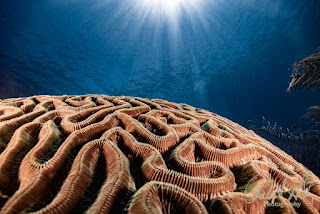
Scene 2: Sunball Over a Reef or Wreck

Sunballs are another situation where photographers sometimes believe HDR is required.
A typical sunball scene contains:
Extremely bright highlights around the sun
Dark foreground reef or wreck structures
In most cases, this can be handled using highlight recovery and tonal adjustments.
Lightroom tools that work well here include:
Highlights slider to control the sun area
Tone Curve to refine contrast
Radial masks around the sunball
Local exposure adjustments on the reef or for the diver
Because modern RAW files contain significant highlight information, it is often possible to recover detail without merging exposures.
Scene 3: Wreck Interior Looking Outward

Wreck interiors can create a strong contrast between:
The dark interior structure
The bright blue water outside
HDR may seem useful in these scenes, but it often introduces problems with moving divers and floating particles.
A more natural result usually comes from selective adjustments:
Set white balance first.
Adjust global exposure carefully.
Lift shadows only where needed.
Use local masking to brighten the diver or key areas of the wreck.
This preserves the dramatic mood of the scene while maintaining realistic lighting.
A Simple Lightroom Workflow for High-Contrast Underwater Images
When editing high-contrast underwater photographs, follow the same workflow taught in the Back to Basics Lightroom series.
Step 1 – Set White Balance
Correct color first so the rest of the adjustments behave naturally.
Step 2 – Adjust Global Exposure
Balance the overall brightness of the image.
Step 3 – Recover Highlights
Lower highlights to control bright areas such as sunballs or surface reflections.
Step 4 – Lift Shadows Carefully
Open shadow areas gradually while avoiding noise.
Step 5 – Use Local Masking
Selective adjustments help guide the viewer's attention toward the subject.
Step 6 – Refine Color Balance
Use temperature, tint, and vibrance to restore natural underwater color.
This workflow usually produces a cleaner and more natural result than HDR merging.
The Goal Is Natural Balance, Not Maximum Dynamic Range
Underwater photography is about capturing the experience of being beneath the surface.
That experience often includes areas of shadow, beams of light, and natural contrast. Trying to force every detail into visibility can remove the atmosphere that makes underwater images compelling.
Instead of chasing maximum dynamic range, focus on balanced light, strong composition, and natural color.
Modern Lightroom tools make it possible to achieve this using a single well-exposed RAW file.
Final Thoughts
HDR can be useful in certain topside situations, but underwater environments often present challenges that make it impractical. By following a structured Lightroom workflow and using selective adjustments, most underwater photographers can achieve excellent results without the complexity of HDR processing.
If you want to learn the full editing system referenced in this article, I suggest exploring my Back to Basics Lightroom Series for Underwater Photographers, where we guide you through the entire workflow from import to export step-by-step.
👉
https://robertherb.blogspot.com/2026/03/editing-underwater-photos-lightroom-guide.html
Written by Robert Herb
Empowering underwater photographers to capture and enhance the beauty of our oceans since 1978.
Stay tuned for more in-depth insights into underwater photography. Let us dive deeper into the art and craft of capturing the marine world. I would welcome any comments or suggestions.
Get ready for an exciting underwater photography adventure. For more details on my upcoming online training course, check out my Training page at RobertHerb.com or email me at bob@robertherb.com.
Sincerely,
Bob Herb
|
|


Comments
Post a Comment
Please let me know your comments.